
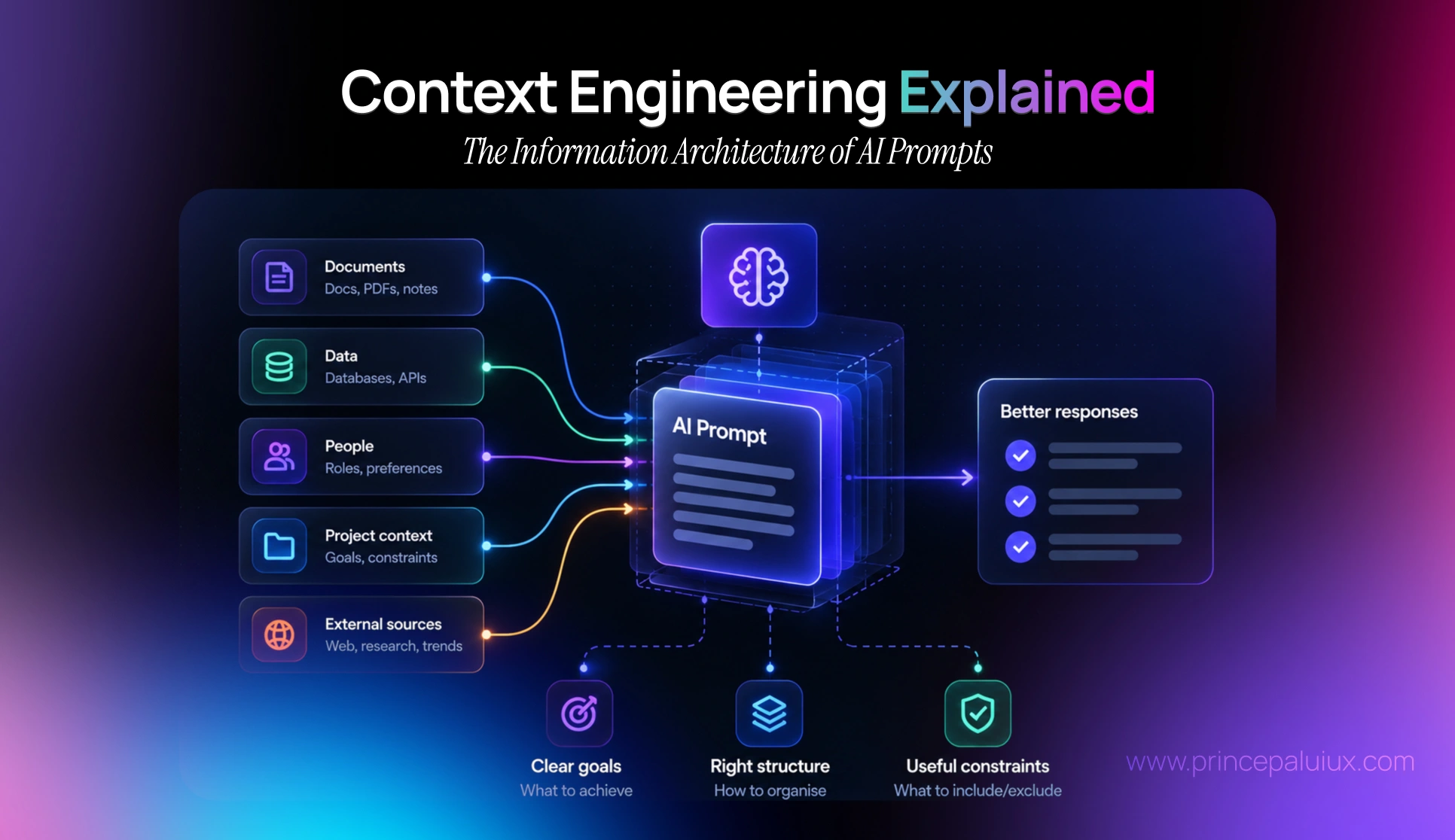
Prompt engineering is dying. What decides AI quality now is context: what the model sees, what it ignores, and what it remembers. Here’s context engineering explained through the lens designers already know: information architecture.
What is context engineering?
Context engineering is the practice of deciding what an AI model sees, ignores, and remembers before it answers. It covers the task, background data, rules, examples, history, and tools, and treats all of that as a designed system rather than one clever prompt.
If that sounds familiar, it should. Designers have been doing this for decades. We call it information architecture: putting the right information in the right place, in the right order, for the person who needs it. Context engineering is the same discipline, except the “person” reading it is a model.
Once you see context as an information architecture problem, a lot of strange AI behaviour suddenly makes sense, and a lot of it becomes fixable.
Here’s what we’ll cover:
- Why clever prompting stopped being the thing that matters
- How context breaks: rot, ambiguity and drift
- What good context is made of, and the six levels of maturity
- Skills, specs and design decisions as context infrastructure
- How to design context into the interface itself
Ask the language model to devise its own optimal prompt … in almost every case, automatically generated prompt did way better than the best prompt found through trial and error [by humans].
Dina Genkina, AI Prompt Engineering Is Dead, IEEE Spectrum
Drawbacks of Text Prompts
We put the burden on the user to articulate good questions, but they may not know what exactly to ask. A good UI helps users incrementally explore the problem and solution space with guidance and nudges.
Why did prompt engineering stop being enough?
Remember when “prompt engineer” sounded like the job of the future? People traded magic phrases. Act as a world-class expert. Take a deep breath. Think step by step.
That era is quietly ending. The talk quotes Dina Genkina’s IEEE Spectrum piece, AI Prompt Engineering Is Dead, which reports something slightly humbling. When you ask a language model to write its own optimal prompt, it almost always beats the best prompt humans found by trial and error.
So if the model writes better prompts than we do, where does our effort actually matter?
The quality of any AI response depends on three things:
- Training data, which you can’t really control
- The model’s design and tuning, which you also can’t really control
- The input, which you can
That third item used to mean “the prompt”. Now it means everything that travels with the prompt. And that’s a much bigger surface.
The burden we put on users
There’s a second reason prompts aren’t enough, and it’s a UX reason. Austin Z. Henley calls natural language “the lazy UI”. We hand people an empty text box and expect them to know what to ask, how to phrase it, and which details matter.
Most people don’t. Not because they’re unskilled, but because they’re still figuring out the problem. A good interface helps them explore it step by step. An empty box just waits.
Tey Bannerman nails the gap in one line from the talk: we’ve been teaching people the grammar of prompting without the vocabulary of thinking. Context engineering is how we supply that vocabulary, so users don’t have to.
Prompt engineering vs. context engineering
| Prompt engineering | Context engineering | |
|---|---|---|
| Focus | The wording of one request | Everything the model sees across a task |
| Unit of work | A single prompt | A system: data, rules, examples, memory, tools |
| Who carries the load | The user, every time | The product team, once, then maintained |
| Typical failure | Vague or generic answers | Context rot, drift, conflicting sources |
| Closest design discipline | Copywriting | Information architecture |
| Scales to agents? | Poorly | Yes, it’s built for multi-step work |
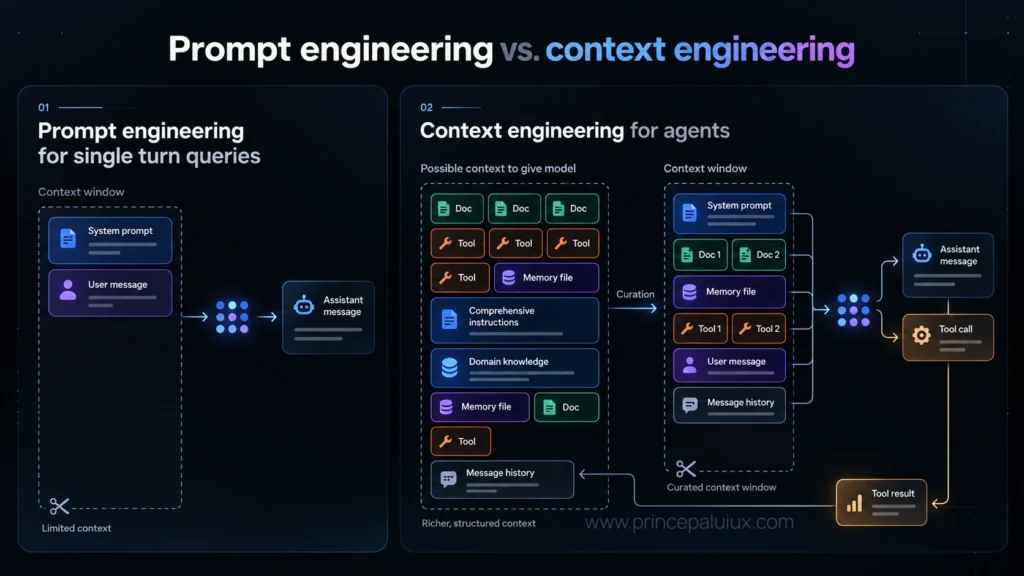
One of the screenshots in the deck makes this concrete. On the left, a prompt for a single-turn question: system prompt, user message, done. On the right, an agent’s context window being curated from a much larger pool of possible context, including domain knowledge, message history, tool calls, and tool results. That curation step is the whole game.
It’s the careful, dynamic construction and maintenance of a model’s information environment, so it can solve the problem reliably. Think of it as IA of AI prompts.
“Context Rot: How Increasing Input Tokens Impacts LLM Performance ”, Chroma Technical Report
How does context break?
Here’s the thing nobody tells you when you start building with AI: context isn’t a bucket you fill once. It’s fragile, it moves, and it decays. Most “the AI is being less intelligent” moments are really context failures in disguise.
Context rot: more isn’t better
The talk leans on a Chroma technical report, Context Rot: How Increasing Input Tokens Impacts LLM Performance. The finding is simple and a bit uncomfortable. As you stuff more tokens into a model’s context window, performance doesn’t hold steady. It decays. And when the question is ambiguous, or doesn’t neatly match the wording in the context, that decay speeds up.
The talk calls it context poisoning. I think of it like a desk. Every document you add makes it a little harder to find the one that matters.
Ambiguity compounds
There are two ways to get context wrong, and they pull in opposite directions:
- Too little context gets you vague answers or hallucinations. The model fills the gaps with guesses.
- Too much context makes it hard for the model to focus on what’s relevant, so it gets confused.
The sweet spot isn’t a number of tokens. It’s relevance.
Poor context hides below the surface
When output goes wrong, we tend to blame the model. The talk lists what’s usually lurking underneath instead:
- Poor data returns generic, poor results
- Contradictions return confusing responses
- Competing sources add noise and fluff
- Lots of irrelevant detail leads to degradation
- Data overload overwhelms the model, and its “reasoning” suffers
If you’ve ever watched an AI confidently mix up two versions of the same policy document, you’ve met the contradiction problem.
Context isn’t static, and it isn’t permanent
This is the part I find most interesting as a UX person. Context changes while people use the product. The talk suggests keeping track of six questions:
| Question | What it means for users |
|---|---|
| What’s in the context? | Past searches, the codebase, uploaded files |
| Local or global? | Is the AI looking at this document, or everything? |
| Session memory | How far back does it remember? |
| Sources of data | Where is this answer coming from? |
| Filters applied | Is something narrowing the results right now? |
| Ignored or deleted context | How do I remove noise I don’t want it to use? |
And as a conversation moves forward, context drifts. Something relevant ten minutes ago becomes partly relevant, then irrelevant. There is a line between “current context” and “no longer relevant”. The point is that somebody has to clean up that second pile. If nobody does, it rots.
You can see tools starting to handle this in the screenshots. The coding agent Cline, for example, shows a visible “condensing the conversation” step when its context gets long. That’s context housekeeping made visible.
What should go into an AI’s context?
Addy Osmani, quoted in the talk, gives what I think is the most useful definition. Context engineering is the careful construction of a model’s context window, with all the relevant memory, knowledge, tools, data, logic, and guidance needed for the task. In his words, it’s onboarding the AI to be at its best.
That word, onboarding, is doing a lot of work. Think about how you’d onboard a new colleague. You wouldn’t hand them every file on the shared drive. You’d tell them what the job is, give them the documents that matter, explain the house rules, show them a few good and bad examples, and tell them who to ask when they’re stuck.
The talk lists exactly that as the ingredients of good context:
- Task description and background data
- Documents, attachments and spreadsheets
- Guidelines, rules and templates to follow
- Examples, good and bad, plus patterns and specs
- Conversation history, current and past
- Tools the model can use, and how to use them
- Limits, boundaries and guardrails
The deck also shows a classic ten-part prompt structure, built around an AI career coach called “Joe”. It layers task context, tone, a reference document, rules for staying in character, a worked example, the conversation history, and finally the user’s actual question. What strikes me is how little of it is the question itself. The user’s words sit near the bottom. Everything above them is architecture.
Context engineering through an IA lens
This is where the “IA of AI prompts” idea really pays off. The core building blocks of information architecture map almost one-to-one onto context design:
| IA concept | What it means for AI context |
|---|---|
| Organisation | Grouping sources by type, priority, and when they apply |
| Labelling | Clear names and tags so the model knows what each piece is (rules vs. examples vs. data) |
| Navigation | Telling the model where to look first, and when to look elsewhere |
| Search and retrieval | Pulling in only the relevant chunk, not the whole archive |
| Content governance | Removing stale, duplicate, and contradictory content |
| User context | Knowing who is asking, their expertise, and what they’ve already done |
If you’ve ever run a content audit on a messy intranet, you already have most of the skills. The only difference is that the reader is a model, and it can’t tell you when it’s lost.
The six levels of context engineering
IA Collaborative lays out a maturity model, and it’s a great way to check where your own product sits:
| Level | What the model gets | What happens |
|---|---|---|
| 0. LLM access | No supporting data | Massive assumptions, no grasp of business constraints, misleading “workslop” |
| 1. Data access | Raw documents dumped into context | Can’t prioritise; often uses the wrong source or hallucinates over it |
| 2. Data mapping | What matters, when to use it, and how to find it | Locates relevant information instead of whatever’s most convenient |
| 3. Logic and reasoning | Rules plus a thought process for your problem | Knows what a good answer looks like, and when to stop |
| 4. Output configuration | Output constraints mapped to business logic, design, and UI | Stops over-generating; right information, right format |
| 5. Evaluation | Ground truth, success criteria and test cases | Consistent, grounded answers; drift and edge cases caught before users see them |
Notice where most teams stop: level 1. They connect a knowledge base, dump everything in, and wonder why answers feel random. The jump from level 1 to level 2, from dumping to mapping, is pure information architecture. It’s also where the biggest quality gains usually hide.
Skills, specs and memory: context that lasts
So far we’ve talked about context for a single task. But the real leverage comes when context becomes reusable, something you build once and every task draws from. The talk covers three ways teams are doing this.
Skills: packaged ways of thinking
By default, the talk points out, AI takes the shortest path to “done”. It isn’t a mind-reader. If you want it to work the way your team works, you have to tell it how.
That’s what a skill does. And the talk is careful to say what a skill is not: it’s not a reference document. It’s a workflow, a way of thinking, a sequence of steps written as a Markdown file that gets loaded into the AI’s context only when the situation calls for it.
The surrounding vocabulary is worth knowing:
| Term | What it is |
|---|---|
| Skill | A reusable package of instructions and workflow for one kind of task |
| Plugin | A bundle of skills plus tool connections, tailored to a role |
| Connector | A link to an outside app (like Jira or Slack), usually via MCP |
The “load only when needed” part is pure context engineering. Instead of stuffing every rulebook into every request, which is exactly what causes context rot, the right knowledge shows up at the right moment.
Tey Bannerman calls this guided AI: we pre-write our thinking, our principles, and how we make decisions, instead of feeding generic input and getting generic output back. In a sense, we borrow other experts’ judgement and make it available on demand. Ryan Rumsey describes the same idea as building thinking infrastructure, systems that hold logic and judgement so people can use them when they need to decide.
Design decisions as infrastructure
This one is for design teams in particular. The talk argues that AI output is less reliable because of the model and more because of tiny inconsistencies that compound over time:
- Decisions made but never written down
- Hard-coded values nobody cleaned up
- Relying on the AI to just “get it” right
The fix is to treat design decisions as infrastructure. Every time the team makes an important decision, it needs a path into a shared skill or spec file that the AI reads. The talk describes an AI-ready design system like this:
- Spec files document each UI component
- A token layer lists every token and stays current
- A closed set of variables that the AI must choose from
- An audit script catches what the AI gets wrong in prototypes
- A sync routine flags spec files that need updating after shipping
Read that list again with an IA hat on. It’s a controlled vocabulary, a governance process, and a content audit, just pointed at a model instead of a website.
Agent’s learning loop mirrors how a new team onboards. It reads the codebase, finds out who knows what, and asks right humans right questions. Now it’s all about the quality of specs.
“Context Rot: How Increasing Input Tokens Impacts LLM Performance ”, Chroma Technical Report
Specs are product thinking
Addy Osmani’s line from the talk deserves its own spotlight: you can’t write a spec that holds up at scale without genuinely understanding what you’re building, including the architecture, edge cases, failure modes, and integrations. Spec is product thinking.
He also notes that an agent’s learning loop mirrors how a new team member onboards. It reads the codebase, works out who knows what, and asks the right people the right questions. So the quality of your specs becomes the quality of your AI’s work. The deck shows Amelia Wattenberger’s experiments with spec-driven tools, where a spec like “Add dark mode support” sits next to the agents working on it and a running list of context changes.
Memory: from fleeting to lasting
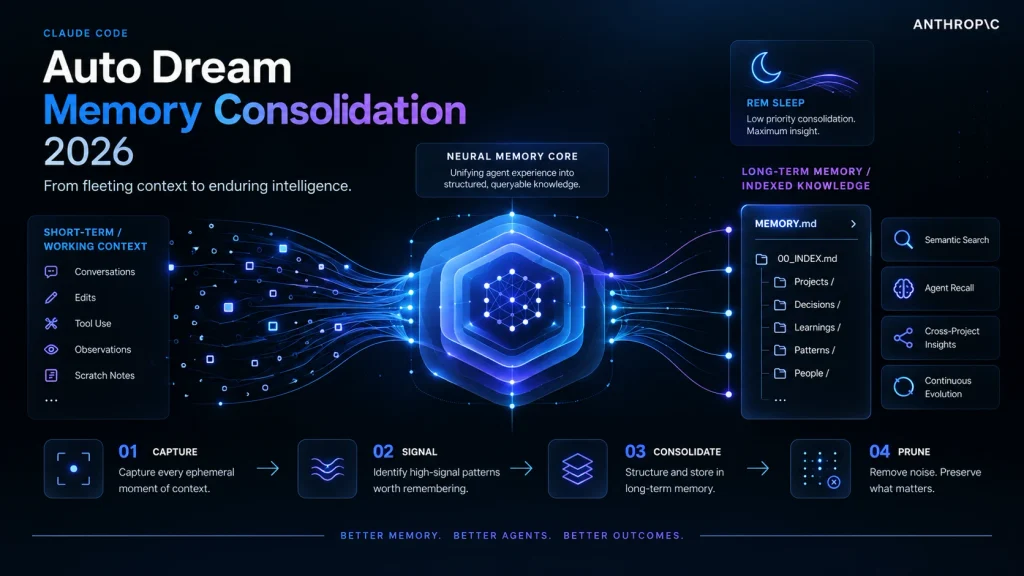
The last piece is memory. “Claude Code: Auto Dream“, a memory consolidation flow. Working context (conversations, edits, tool use, observations, scratch notes) gets captured, filtered for high-signal patterns, and consolidated into long-term, indexed knowledge, such as a MEMORY.md file with folders for projects, decisions, learnings, and patterns.
Whatever you think of the name, the idea is solid. Short-term context is noisy and temporary. Long-term memory should be curated, structured, and searchable. That’s information architecture again, this time for what the AI remembers.
How do you design context into the interface?
Here’s where context engineering stops being a backend job and becomes a design job. Users can’t see the context window. But they can see, shape, and correct context through the interface, if we give them the controls.
The talk’s closing checklist has a line I’d put on every AI team’s wall: the easiest way to add context is with UI controls. Not longer prompts. Controls.
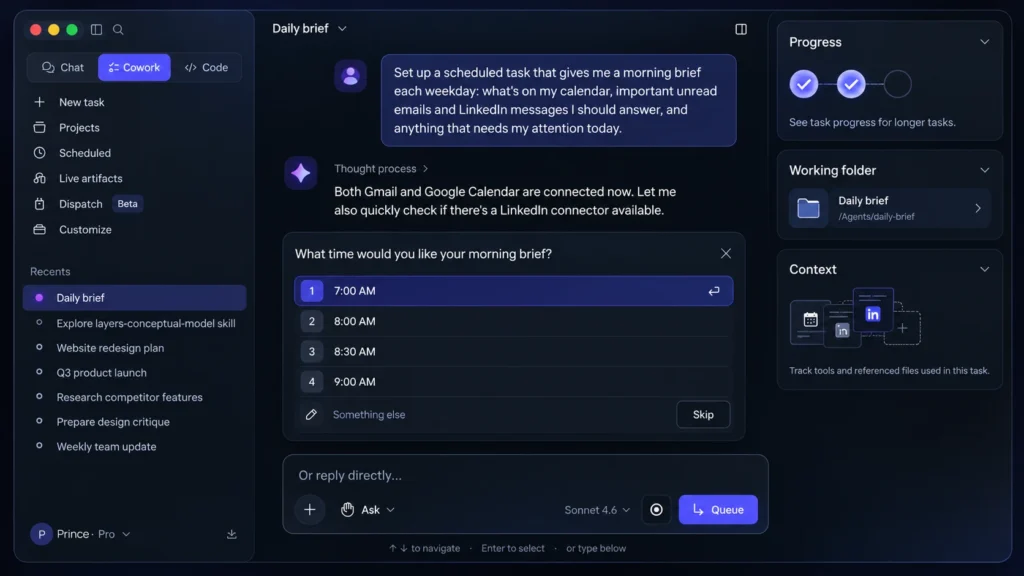
We help people construct their tasks with atomic suggestions — the building blocks of a prompt. People can select what they want to do, use, make or their combination.
Luke Wroblewski, Prompt Building UIs
Let the UI collect context, not the text box
A few patterns from the deck do this well:
- Filters and scope. In the deck’s NetSuite example, an income statement already carries its context: date range, fiscal year, subsidiary, account type. The AI doesn’t need the user to type any of it.
- Columns as questions. Legal tools like Legora show “tabular review”, where each column is a question asked across many documents (confidentiality, termination, reporting obligations). The column header is the context.
- Task builders. Luke Wroblewski describes helping people build tasks from atomic suggestions, picking what they want to do, use, and make, instead of writing it all from scratch.
- Precision knobs and presets. Saved prompt presets help people move between modes quickly and accurately.
- Working folders. Agent tools such as Claude let people point the AI at a working folder of files, which quietly sets the scope for everything that follows.
Each one turns invisible context into something users can see and adjust. That’s also how you beat the blank page effect, the “what do I even type?” paralysis of ask-me-anything interfaces.
Show what the AI is using
The talk is clear on why this matters: people build confidence when they understand the rationale behind an output and the sources the AI used. If users can’t tell what’s in context, they can’t judge whether to trust the answer.
Useful patterns from the deck:
- Auto-summary. When someone uploads a file, the AI plays back how it understood it. A misunderstanding gets caught before it shapes every answer that follows.
- Source links. Every answer points back to what it drew on.
- Scope indicators. Make it obvious whether the AI is looking at this document or all of them.
- Data layers. Answers come back as tables, filters and charts that people can explore, rather than a wall of text.
Context on demand, not context overload
There’s a balance here. Luke Wroblewski observes that people increasingly focus on the output and less on the process behind it. They only open the reasoning timeline or the references when something feels off.
So don’t force everyone through the full context every time. Keep it one click away. Show the summary by default, with the sources, the scope, and the reasoning ready for the moment someone needs to check.
Remember that queries reshape context
Finally, context and queries are tied together. As users navigate, context changes. Some prompts are contextual (“summarise this“), others are global (“what did we decide last quarter?”). A good interface makes that difference visible, so people aren’t surprised when the AI looks in the wrong place.
A quick checklist for designers
- Can users see what’s in the AI’s context right now?
- Can they add context through controls instead of typing?
- Can they remove or ignore context they don’t want used?
- Does the product clean up stale context as a session moves on?
- Is long-term memory curated, or does it just pile up?
- Do you have a spec or skill that holds your team’s decisions?
- Are you testing context changes with evals, not just vibes?
Context engineering FAQ
What is context engineering in simple terms?
Context engineering is designing everything an AI model sees before it answers: the task, background data, rules, examples, conversation history, tools, and limits. It’s like onboarding a new colleague properly instead of handing them one sticky note.
What’s the difference between prompt engineering and context engineering?
Prompt engineering focuses on the wording of a single request. Context engineering designs the whole information environment around a task, including data, memory, tools, and rules. Prompting is copywriting. Context engineering is information architecture.
Is prompt engineering dead?
Mostly, as a standalone skill. Research reported by IEEE Spectrum found that models usually write better prompts for themselves than humans do through trial and error. What still matters is the context you give them.
What is context rot?
Context rot is the drop in AI performance as more tokens are added to the context window. A Chroma technical report found the decay speeds up when a question is ambiguous or doesn’t match the wording in the context.
How much context should you give an AI?
Enough to remove guesswork, and no more. Too little context leads to vague answers and hallucinations. Too much makes it hard for the model to focus. Aim for relevance, not volume.
What are the levels of context engineering?
IA Collaborative describes six: LLM access with no data (0), raw data access (1), data mapping (2), logic and reasoning (3), output configuration (4), and evaluation (5). Most teams stall at level 1, dumping documents in without structure.
Why is context engineering a UX problem?
Because users shape context through the interface. Filters, scopes, presets, task builders, and source links all add or explain context. The easiest way to add context, as the talk puts it, is with UI controls.
The bottom line
We spent a few years treating AI quality as a writing problem: find the perfect words and the model will behave. It turns out it was an architecture problem all along.
The model can only work with what it’s given. Give it everything, and it drowns. Give it nothing, and it guesses. Give it a well-organised, well-labelled, well-maintained information environment, and it starts to look a lot smarter than it did yesterday.
That’s good news for designers. Organising information for someone who needs it is exactly what we’ve always done. The reader just changed.
Sources
- Vitaly Friedman, The State of AI for 2027, talk at Maven, 15 October 2026 (the primary source for this article)
- Dina Genkina, AI Prompt Engineering Is Dead, IEEE Spectrum (as quoted in the talk)
- Chroma, Context Rot: How Increasing Input Tokens Impacts LLM Performance (as quoted in the talk)
- Addy Osmani, Context Engineering: Bringing Engineering Discipline to Prompts (as quoted in the talk)
- Addy Osmani, How To Write A Spec For AI Agents
- Austin Z. Henley, Natural Language Is The Lazy UI (as quoted in the talk)
- Tey Bannerman, The Four Modes (as quoted in the talk)
- Luke Wroblewski, Context Management Patterns and Prompt Building UIs (as quoted in the talk)
- IA Collaborative, The Levels of Context Engineering
- Amelia Wattenberger, Why Chatbots Are Not The Future