
Table of Contents
- Why every researcher is asking this question
- So what is this map, and why should you trust it?
- Wait, didn’t we agree the research workflow was a myth?
- Crawl, walk, run: the quick tour
- Seven months. That number should keep you up at night
- Crawl: when AI is your very fast, slightly overconfident intern
- Walk: the moment your team starts building its own tools
- Run: when research shows up before anyone asks
- Glossary takeaways: the words that decide if your AI research can be trusted
- So what happens to researchers?
- The whole map on one page
- Where to start on Monday
- Frequently asked questions
How to AI UXR
(Storytelling Version)
Why every researcher is asking this question
Let me guess. Someone on your team has been asking how to use AI in research, maybe your VP or your PM, maybe the voice in your own head at 11 pm. You’ve tried ChatGPT for a discussion guide. You’ve let an AI note-taker sit in on a usability test. And you still can’t shake the feeling that you’re doing it wrong, or at least doing it smaller than everyone else.
You’re not alone. The numbers tell a strange story. According to the User Interviews State of Research report, AI adoption has climbed to 80% of researchers, up 24 points in a year, yet 41% see it negatively. The top worries are hallucinations (91%) and the erosion of critical thinking (63%).
People are using the thing and worrying about the thing at the same time. That’s the high-adoption, high-anxiety mood most research teams are living in right now. Which is exactly why the How to AI UXR map from The ResearchOps Review is worth your time. It doesn’t hype AI, and it doesn’t scold you for using it. It shows you what real research teams are doing, sorted by how mature their setup is.
So grab a coffee (or chai, if you’re doing this properly). Let’s walk through it.
So what is this map, and why should you trust it?
Fair question. The internet is full of “10 AI tools for UX researchers” listicles written by people who have never run a diary study.
This one is different. Kate Towsey, who has shaped a lot of how our field thinks about ResearchOps, built the map from 562 data points gathered between January and May 2026. The inputs came from desk research, one-on-one conversations, and three working sessions with fifty research and ResearchOps professionals who were actively testing the limits of AI-augmented research. The platform Strella sponsored it.
There’s a small detail in the method note that I love. The ResearchOps Review treats human-written content as a brand value. They say AI can’t yet write original work with the depth they want. But they did use AI to help analyse and synthesise the data points, and they admit it would have been hypocritical not to. They say the process needed careful, systematic checking to keep the rigour intact.
Hold onto that idea. AI made the work faster, and humans kept it honest. That tension runs through the whole map.
Wait, didn’t we agree the research workflow was a myth?
Here’s a mild contradiction to start with. Most researchers will tell you the “standard research workflow” never really existed. Studies loop back. Recruitment stalls. Analysis starts before the last interview ends. Real projects are messy, and AI is making them messier.
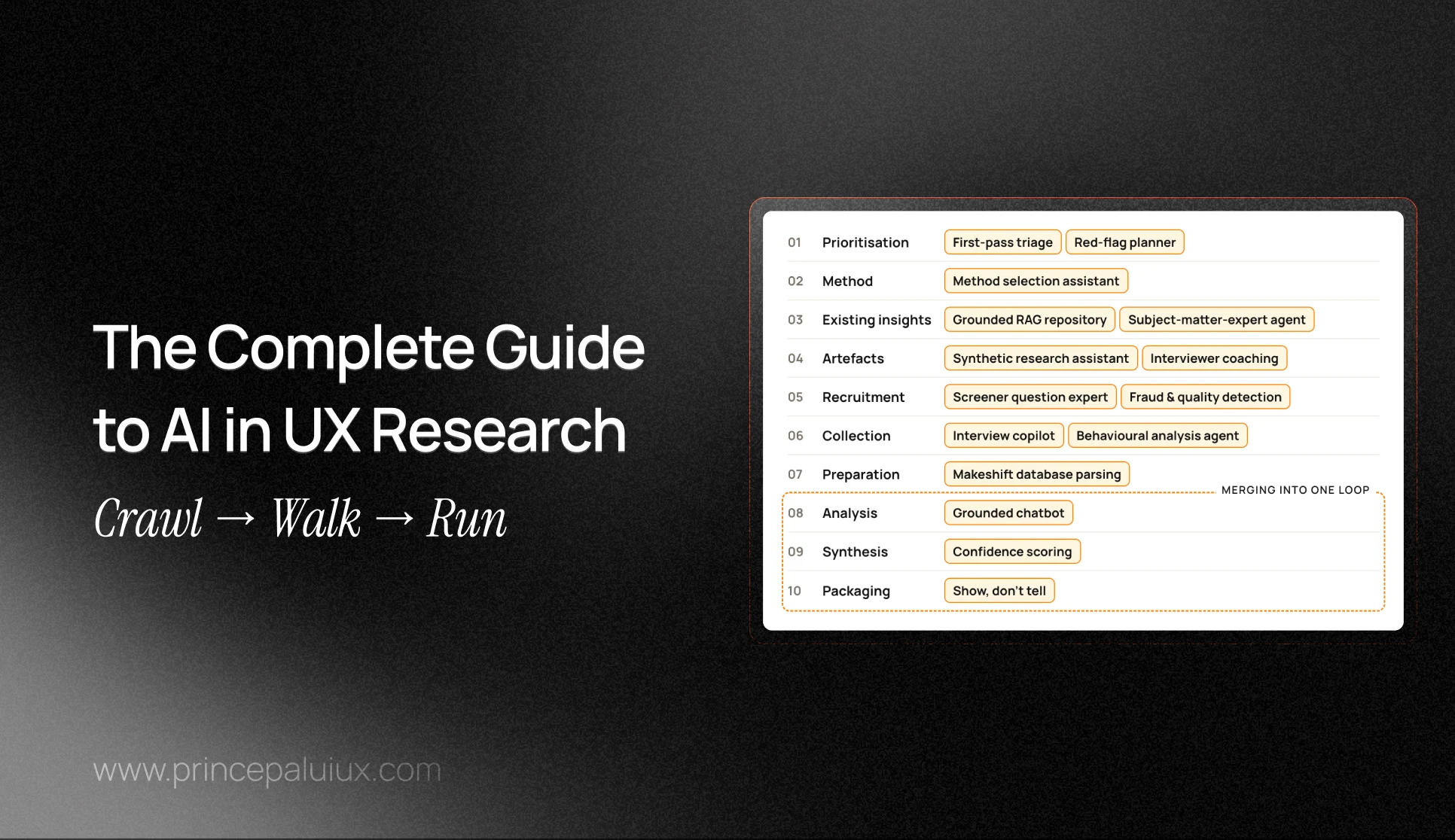
And yet the map uses a plain, linear workflow with ten stages:
- Prioritisation and roadmapping
- Method selection and scoping
- Existing insights retrieval and reuse
- Research artefact creation
- Participant recruitment
- Data collection
- Data preparation
- Analysis
- Synthesis
- Insights packaging and communication
Why use a model everyone agrees is wrong? It’s familiar. The contributors decided a linear workflow is still a handy set of pegs to hang new ideas on. Think of it like the London Tube map. It’s geographically wrong, and nobody cares, since it gets you where you’re going.
The interesting part is what happens to those pegs as teams mature. They start to melt into each other.
Crawl, walk, run: the quick tour
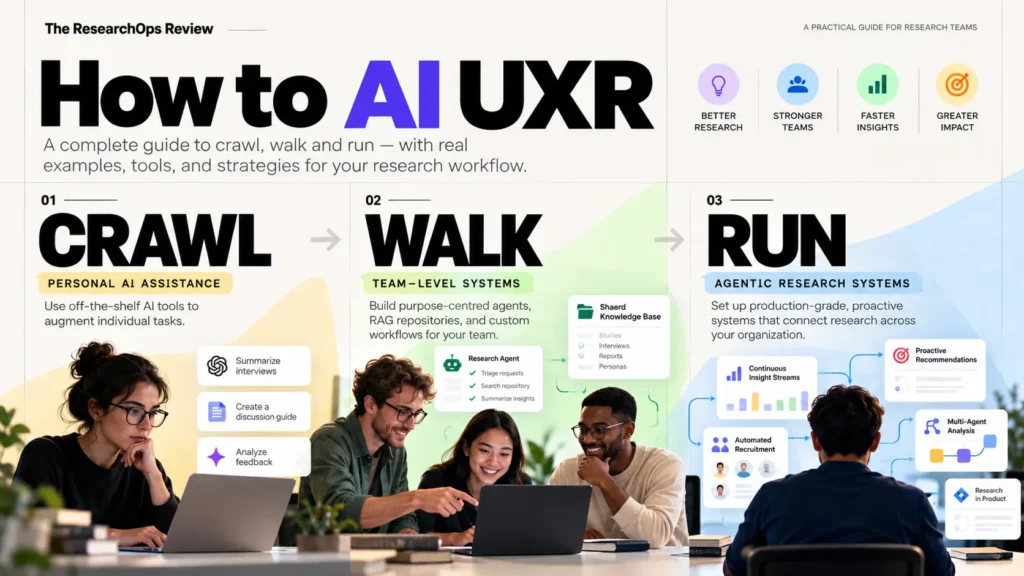
The map sorts every AI practice into one of three maturity levels.
| Level | What AI does | Who benefits | What happens to the workflow |
|---|---|---|---|
| Crawl | Off-the-shelf tools help with single tasks for single people | Mostly the individual researcher | Stays mostly intact. AI does what a human used to do |
| Walk | Custom agents, skills, and RAG systems built for a team or org | The team and its partners | Analysis, synthesis, and packaging start to merge |
| Run | Human-in-the-loop agentic systems that push research out proactively | The whole organisation | Steps collapse into “black box” stages that need formal evals |
One more thing worth knowing: the map has no separate ResearchOps section. That sounds like an oversight until you hear the reasoning. AI is a technology, so the whole AI-augmented workflow is being systematised. In other words, it’s all operations now. Classic “ops” tasks are flagged with a key, but the line between research and ResearchOps is getting blurry fast.
If you’ve been following the rise of hybrid roles like the Human-AI Interaction (HAX) Designer, this will feel familiar. Craft and systems are fusing.
Seven months. That number should keep you up at night
A quick detour into a stat that frames everything.
You know Moore’s Law, the old rule that computing power doubles roughly every two years. The map points out that AI agents are moving much faster. The source is research from METR, which found that the length of tasks frontier AI agents can complete on their own, with 50% reliability, has doubled about every seven months for six years. The researchers note the trend may have sped up in 2024.
What does that mean for you, sitting there with a stack of transcripts? It means the map is a snapshot, not a rulebook. A practice that sits at “Run” today may be a checkbox in your research platform by next spring. Towsey says as much: explore the solutions with curiosity and care.
Curiosity and care. I’d tattoo that on the wrist of every ResearchOps lead if I could.
Right. Let’s crawl.
Crawl: when AI is your very fast, slightly overconfident intern
At the Crawl level, people use off-the-shelf LLMs like ChatGPT, Claude, Gemini, or Copilot to draft, summarise, cluster, and package. They use them as thinking partners too. Nothing is systematised. The gains are personal and mostly invisible to the wider organisation.
But don’t mistake “Crawl” for “beginner.” Something big is already happening. Steps that used to happen one after another are getting squashed into a single conversation with an AI. You paste in notes, ask a question, get a summary, ask for a slide outline, and in twenty minutes you’ve done what used to take three separate work sessions.
Deciding what to study (and why AI makes a lousy boss here)
At the prioritisation stage, teams use AI to cluster long lists of research requests, size issues from big piles of customer data, and spot knowledge gaps. Some map stakeholders to products so intake filtering gets easier. Others use AI as a brainstorming buddy to find gaps before stakeholder meetings even start.
Here’s the catch. AI tends to affirm rather than interrogate. Ask it “Is this the right research priority?” and it’ll very often say “Great question, yes!” That’s pleasant. It’s also useless for prioritisation. The final call still belongs to a researcher’s judgment.
(Small tangent: this is the heart of what I argue in Judgment Is The Advantage. Tools that agree with you are comfortable. Comfort is not a strategy.)
Method selection works much the same way. AI serves as a one-on-one sparring partner for picking methods and shaping a study. It can challenge your assumptions, rephrase fuzzy business goals into clean research questions, or produce templates based on budget and deadline. Useful? Absolutely. Reliable? Only as reliable as the context you feed it, since at Crawl there’s no shared system behind it.
A practical tip: tell the model outright to disagree with you. “List three reasons this method is the wrong choice” gets you much further than “Is this a good method?”
What do we already know?
This is where Crawl-level AI shines. LLMs, wikis, and repositories with built-in AI make it far quicker to find existing insights. Deep-research tools can run what’s basically an instant literature review.
A few patterns stood out:
Source interrogation. Load documents into a deep-research tool to learn the domain fast, question the material, and figure out which sources deserve a full read.
Multi-source summarisation. Pull insights from scattered places like SharePoint, Confluence, your research repository, and customer feedback tools, then group and summarise them.
The vetted-PDF trick. Use a deep-research tool to find key sources, vet each one by hand, print the best to PDF, then load that curated set back into the tool for questioning.
Notice the pattern? Citations are the quality check. If a deep-research tool can’t show you where a claim came from, treat it like a rumour at a wedding. Entertaining, maybe true, not something you’d repeat to your boss.
Google NotebookLM gets a lot of love here. One team loads prior research and documentation for large mixed-methods projects, maps what’s known, flags where the evidence is inconsistent, and lists open questions. That’s a proper roadmap input, built in an afternoon.
Beating the blank page
Artefact creation (plans, screeners, interview guides, workshop materials) is where most people first feel AI’s speed. Give an LLM some domain context, like meeting recordings, past research, and internal docs, and it’ll draft a research plan in seconds.
The map calls this “0-to-1 drafting,” and it’s honest about the downside. Outputs usually need heavy editing before they’re fit for use.
There’s a sneakier problem too. Researchers spend more and more time helping non-researchers fix work that looks polished but isn’t. A PM shares a beautifully formatted discussion guide, and question four is leading, question seven is double-barrelled, and the whole thing tests the wrong hypothesis. AI made it pretty. It didn’t make it right.
Two practices deserve more attention than they get:
Synthetic cognitive testing. Ask an LLM to play a customer persona and run your interview activities past it. It won’t replace a real pilot, but it catches clunky wording fast. Some survey tools let you fill a survey with dummy data so you can preview your final charts before launch.
Job mapping. Use jobs-to-be-done prompts to sketch the structure of a user’s workflow before discovery starts. You walk into the first interview with a hypothesis map instead of a blank whiteboard.
Recruiting in the age of AI-written screener answers
Recruitment is getting faster. LLMs draft outreach emails, recruitment ads, and personalised greetings based on past examples. They clean participant lists so you can personalise invitations. One contributor put the payoff simply: personalised greetings like “Hello, Sarah” get a much better response rate.
AI can even be the bait. A few teams use AI as a conversation hook to grow their participant panel, since, frankly, everyone wants to talk about AI right now.
Here’s the twist. As more applicants use AI to fill in screeners, spotting fake or AI-generated responses is part of the recruitment job now. Teams use AI to flag AI-like patterns in applications. Fighting fire with fire.
The map adds a line I really appreciate: a human still needs to check the flags, since some people just write well. Don’t reject your most articulate participant because a model thought they sounded too polished.
In the room: data collection
At Crawl, the core of data collection hasn’t changed. You still show up, ask good questions, and stay quiet long enough for people to answer.
What’s changed is the support around you. AI takes real-time notes and summarises sessions. It creates “roll-ups” across multiple sessions, which helps you spot patterns to probe or gaps in your notes while the study is still running. Finding out on day two that you forgot to ask about pricing beats finding out in synthesis.
Unmoderated tools come with built-in AI features now, and AI-moderated research is growing. One interesting use case is sensitive topics, where some participants open up more with no human on the other end. The map is firm on the ethics: participants must always consent to how their data will be used.
Teams are speeding up UX scorecarding with Figma plugins such as Measure UX too. Minutes instead of hours.
Prep, analysis, and synthesis start to squash together
Data preparation used to be the boring admin stage. Now AI handles much of it quickly and accurately:
- Redacting personally identifiable information (PII) and anonymising quotes from audio, text, or video
- Cleaning transcripts and cutting filler words
- Renaming files to match your naming conventions so they stay searchable
- Enriching metadata tags so insights are easier to find later
- Weeding out junk data like blank responses and untitled tests
On the analysis side, deep-research tools speed up the path from raw data to insight. Teams use AI for thematic clustering, codebooks for huge piles of open-ended feedback, and automatic tagging of key moments in transcripts. Smart teams compare AI coding against human coding to check accuracy. Some parse multiple transcripts into synthesis matrices to compare how users answered the same question.
Two warnings worth repeating. Results from these tools are supplementary, not complete, and need checking. And AI still can’t reliably read facial expressions or gestures in session videos. If your analysis leans on “she hesitated before clicking,” that’s still your job.
For synthesis, the best Crawl practices treat AI as a sparring partner, not an oracle:
Counter-bias querying. Ask the model to find outliers, edge cases, and contradictory evidence to push back on its habit of over-weighting the loudest themes.
Strategic insight weighting. Ask the model to rate each theme’s strength and relevance and explain its reasoning.
“Did we miss anything?” Run a gap analysis that compares study results against the product brief.
Cognitive support. Researchers with ADHD use AI-generated summaries and action items to manage the heavy mental load of synthesis. Accessibility gains are some of the most human outcomes of all this tech.
When research is low-risk, or AI outputs have been properly evaluated, some teams compress prep, analysis, synthesis, and packaging into a single step. Raw transcripts go in. Actionable insights come out. That’s powerful, and it’s exactly where your checking habits matter most.
Packaging: prettier decks, and the podcast question
AI speeds up the writing of research content and makes new formats possible. Teams use tools like Gamma to build polished decks, where the AI suggests content density and visuals. Researchers use LLMs to sharpen share-out language.
Some teams reshape findings by hand for different audiences: an executive summary, an ROI summary, a risk summary, or an engineering bug list. Same evidence, different doors.
Then there are podcast-style audio briefings and video overviews (NotebookLM’s audio overviews are the obvious example). Stakeholders who never read a report might happily listen to a ten-minute recap on their commute. Will audiences tire of these formats once the novelty wears off? Nobody knows yet. My hunch is the format survives, and the generic, samey versions don’t.
The quiet shift hiding inside Crawl
At Crawl, it looks like nothing structural has changed. Same researchers, same studies, just faster. Look closer, and two things are happening.
First, stages are collapsing. Preparation bleeds into analysis. Analysis bleeds into packaging.
Second, the gains are invisible. When one researcher saves six hours a week, the organisation doesn’t see it. There’s no shared prompt library, no team-wide eval process, no memory of what worked. Every researcher quietly reinvents the same wheel in their own chat window.
That second point is the real reason teams move to Walk. It isn’t about fancier tools. It’s about turning private speed into shared systems.
A Crawl-level starter kit:
- Keep a shared prompt doc, even if it’s a simple Notion page
- Always ask AI for contradicting evidence, not just themes
- Demand citations from any deep-research tool, and click a few
- Strip PII before anything goes into a public LLM
- Compare a sample of AI coding against your own before trusting it at volume
Walk: the moment your team starts building its own tools
The map describes Walk as building purpose-centred agents, skills, and Retrieval-Augmented Generation (RAG) systems that extend off-the-shelf AI. The focus moves from “how fast am I” to “how well does our team work.” And a new discipline shows up that most researchers never signed up for: evaluations, or evals.
My one-line version: at Walk, you stop asking AI for help and start giving AI a job.
That shift changes a lot. A chatbot that drafts your screener is a helper. An agent that builds screeners for every designer in the company, from a question library it assembled itself, is closer to a colleague. A colleague whose reasoning you can’t always see.
The map names three new worries at this level. Synthetic personas and AI-moderated data collection create “black-box insights.” There’s a risk of AI data loops, where AI-made outputs feed back in as inputs. And parts of the workflow merge, especially analysis, synthesis, and packaging.
The building blocks, minus the jargon fog
| Term | What it is | Why a researcher should care |
|---|---|---|
| Agent | An AI system that plans steps, makes decisions, and takes actions to finish a goal | It can squash a multi-step process into one output you can’t easily trace |
| Skill | A reusable, structured procedure an agent or person applies to a specific task | It standardises quality and makes work easier to audit |
| Custom GPT or Gemini Gem | A pre-set assistant with its own instructions and knowledge files | It spreads good practice across a team, and it spreads mistakes just as fast |
| RAG | A setup where the AI pulls from your trusted sources before answering | Answers get more trustworthy, but only if retrieval is good and citations are kept |
| Synthetic persona | An AI model prompted to behave like a type of user | Handy for rehearsal, risky if treated as real evidence |
| Eval | A systematic test of an AI’s accuracy and reliability against set criteria | Without it, “looks fine to me” becomes your quality test |
The front desk: triage, briefs, and method pickers
Every research team has a front desk problem. Vague requests pour in. “Can we do some research on onboarding?” What does that mean? Is it even a research question?
At Walk, teams build agents to handle that front desk before a researcher joins:
First-pass triage agents let stakeholders sort their own requests.
Brief-writing agents interview designers about their decisions and unknowns, then output a structured brief. Most bad briefs come from nobody asking the right follow-up questions, so this fixes a lot.
A “red-flag planner” runs product documents through a prompt chain. It surfaces unvalidated assumptions, flags user-sensitive decisions with no evidence, and outputs a ranked list of research opportunities.
Intake skills ask questions about a project, then recommend how to run the research, if a partner should self-serve or talk to a researcher, and if the research should happen at all.
An AI that says “you don’t need a study for this” is doing a researcher a real favour.
For method selection, teams build assistants (often a Custom GPT) that recommend a survey, usability test, or diary study. The better versions sit on top of company context and the repository. That’s the gap between a generic “try a survey” and a grounded “you ran a survey on this segment in March, run five interviews to explain the drop-off.” If you’ve read my piece on design research inside a product roadmap, you’ll see the link.
Talking to your repository instead of reading it
At Walk, custom RAG repositories and subject-matter-expert agents let partners question existing insights and “converse” with research, without switching tools or reading full reports.
The average stakeholder was never going to read your 42-slide deck. But they might ask a Slack bot, “What do we know about why SMB customers churn in month two?” and read a three-paragraph answer with links to the source studies.
Patterns from the map:
- A hierarchical repository with master notebooks per customer segment and project notebooks under them
- Subject-matter-expert agents for each product stream
- Agents you query straight from Slack
- A model council, where several LLMs do the same desk research and another AI compares their reports
- Strategic memos that join signals from multiple studies into one document
Here’s the thing: RAG lowers errors. It doesn’t remove them. When Stanford researchers tested RAG-based legal research tools, the tools from LexisNexis and Thomson Reuters still hallucinated between 17% and 33% of the time, even though they beat general-purpose chatbots. Keep citations visible and spot-check your repository bot against source studies every month or so. A bot that invents findings with confidence is worse than no bot at all.
From meeting notes to screener in seconds
Purpose-built agents help non-researchers write better plans and screeners. Examples worth copying:
- A synthetic research assistant trained on your team’s standards, helping anyone draft guides, questionnaires, and screeners
- Interviewer coaching agents that review transcripts and give feedback on interviewing skills
- A screener question expert skill that builds screeners from a library of past questions (which an LLM helped build)
The surprise: researchers building functional prototypes themselves with tools like Claude Code or Codex. You describe the flow, get an interactive prototype, and test it with users by Thursday. The map calls this “the emergent make phase.” Researchers are starting to make things, not just study them.
Recruitment gets a back office
At Walk, recruitment becomes a system:
- Fraud and quality agents that watch for inconsistent, generic, or scripted answers
- Panel management agents that handle reminders, rescheduling, and no-show tracking
- Participant dossiers that summarise a B2B participant’s background before an interview
- Short AI-moderated interviews to vet who’s worth talking to in depth
That last one carries a warning: don’t waste potential participants’ time, or you risk brand damage. Teams are also segmenting audiences with AI-enabled analytics tools, no analyst required, once they’ve taught the AI their data field names and descriptions.
Synthetic personas: the part everyone argues about
This is the most divisive topic in the whole map.
At Walk, teams build synthetic personas from existing, well-researched personas so designers and PMs can “vibe check” their work. Some build persona libraries from real customer data, persona chatbots that simulate preference tests, and synthetic panels for low-risk research.
So why am I nervous? The outside evidence is shaky. A MeasuringU review of synthetic user experiments describes one attempt to replicate 14 classic social science studies with GPT-3.5: six gave unusable data, five failed, and only three succeeded. Other studies found synthetic users describing behaviour real users avoid, and caring about everything roughly equally, which is fatal for prioritisation. An ACM Interactions article in early 2026 made a sharper point: a synthetic user can’t be falsified. Real users surprise you. Synthetic ones hand your assumptions back as dialogue.
So the map includes synthetic personas, and the research says be wary. Both are right. Use them for rehearsal, not evidence. Pilot a discussion guide. Pressure-test copy. Catch the obvious stuff. One contributor built an AI heuristic evaluator that reviews UI screenshots before design critique, with a refreshingly modest verdict: “It can catch simple things we sometimes miss.”
Simple things. Not strategy. And watch for data loops. If synthetic outputs land in your repository, and your repository feeds the next set of synthetic personas, you’re slowly replacing customers with echoes.
In the room: hybrid moderation and co-creation’s comeback
- Hybrid moderation: an AI moderator runs the interview, but participants can choose to have a human join
- Interview copilots that take notes, summarise live, and let you adjust the guide on the fly
- Co-creation sessions run inside rapid AI prototyping tools, which means more usability tests on interactive prototypes instead of static mockups
- International research at volume, since AI moderation makes multi-language studies far more doable (for teams in India running studies in Hindi, Punjabi, Tamil, and English, that’s no small thing)
- Behavioural analysis agents, like a Hex agent, that analyse user logs without a separate quant specialist
Prep work that makes AI smarter
At Walk, preparation decides if AI helps or guesses:
- Agents flag low-effort responses and missed questions before analysis
- Teams parse transcripts into structured databases or comparative user-path maps
- For usability tests, a screen-by-screen description of the product flow gives agents the context they need
- AI formulas in Google Sheets translate and interpret raw data from global studies
- For survey and NPS analysis, clear columns, clean rows, and sensible labels make data machine-ready
Most bad AI analysis traces back to a messy spreadsheet with columns named “Q7_final_v2.”
The big merge: analysis, synthesis, and packaging become one loop
This is the heart of Walk. You finish ten interviews. Instead of sticky notes, you load transcripts into a grounded chatbot, maybe built on NotebookLM, and start asking questions. “Where did people hesitate?” “Who disagreed with the majority?” It answers with citations. You push back. Analysis and synthesis happen in the same conversation.
Other practices here include AI-built codebooks for large datasets (with regular evals), synthesis matrices for AI-assisted but human-led analysis, and early summaries so stakeholders get a quick read while deep analysis continues. Some teams build confidence scores that combine research, product feedback, and sales notes with tools like Perplexity. The glossary warns these can create false precision. A “78% confidence” label looks scientific. Ask how it was calculated.
Then packaging joins the loop. The map puts it bluntly: reports are old news. Researchers show rather than tell with quick prototypes. They make diagrams and storyboards with Napkin, Midjourney, or Google’s Nano Banana. Some build idea-scoring skills that rate ideas against company plans. And some use AI coding tools to make small product changes themselves: fixing copy, adjusting UI details, generating simple components. If a test shows a confusing button label and the fix is three words, why wait six weeks in a backlog?
Evals: the unglamorous job that decides everything
If you take one idea from Walk, take this one. Every system above makes judgment calls you can’t fully see. The map’s glossary says it plainly: without evaluation, subjective judgment becomes the acceptance test, and quality slips quietly over time.
Teams handle this by turning qualitative methods into machine-readable grounding documents, using tools like Cursor for large-scale labelling and prompt analysis, running the same analysis across several models to compare results, and using agents to flag inconsistencies between PRDs and transcripts.
Why does this matter now? Gartner predicts more than 40% of agentic AI projects will be cancelled by the end of 2027 over rising costs, unclear value, or weak risk controls. The research agents that survive will be the ones teams can prove work. Evals are that proof.
Is your team ready to walk?
| Signal | Ready to Walk | Stay at Crawl a bit longer |
|---|---|---|
| Prompt habits | The team shares prompts and templates | Everyone has secret prompts |
| Repository | Studies are tagged, named, and findable | Research lives in random decks and inboxes |
| Data hygiene | PII removal and consent are routine | Nobody’s sure what’s allowed in which tool |
| Checking | You compare AI output to human work regularly | You trust outputs that “look right” |
| Demand | Partners keep asking the same questions | Requests are rare and one-off |
If you’re mostly on the left, start with one agent that solves one boring, repeated problem. Intake triage is a great first pick. If you’re mostly on the right, fix the plumbing first. For the design side of building trustworthy agents, see UI/UX principles for agentic AI systems.
Run: when research shows up before anyone asks
Picture a product meeting. Three PMs are debating why trial users drop off on day four. Someone says, “We should really do some research on that.” Then a message pops up in the meeting chat from an agent: we studied this in February, here are the three main reasons, here’s the report, and there’s a gap on enterprise trials worth a new study.
Nobody filed a request. The research came to the meeting.
The map describes Run as production-grade research systems that anticipate what the organisation needs and push insights out, instead of waiting for a brief. Multi-agent pipelines and analytics hooks squeeze the workflow into far fewer steps. Whole chunks become black boxes, which is why the map calls evals a key operational requirement here.
The roadmap that (almost) writes itself
- Meeting agents that “listen in” and chime in with existing insights or suggest new research
- Planning tools with built-in tracking, so the research team sees initiatives across the org and builds its roadmap around them
- Weekly PESTLE briefings from a desktop agent like Claude Cowork, covering political, economic, social, technological, legal, and environmental signals
- Background agents that surface related research whenever someone mentions a new study
- When the library search comes up empty, the agent reroutes the person to request original research, and AI sorts those requests by strategic fit
That last one is lovely. The empty search result becomes a research request, not a dead end.
Nobody needs a researcher to scope a study anymore. Or do they?
The map says partners no longer need a researcher to scope a study at Run. Agents route requests to the right method, contact, or self-serve template.
But look at what those agents are built from: the team’s research SOP, an agent trained on ethics, privacy, and risk, and a routing agent that knows when a method is too complex for self-service. Every one runs on a researcher’s knowledge. The researcher didn’t leave scoping. They moved upstream and wrote the rules once instead of repeating them a hundred times.
The most mature idea is a risk-based framework. An agent uses behavioural analytics to decide when traditional research steps matter. High-risk research gets the full treatment. Low-risk work goes to AI moderation, self-service, or straight to production. Not every question deserves a six-week study. Some deserve an A/B test and a coffee.
Your repository learns to talk back (and to push)
At Run, retrieval triggers instant content creation. Much of the work is plumbing, and that’s where the quality comes from:
- Pipelines that convert old reports into Markdown, which agents read far better than PDFs and decks
- Semantic or vector-based search that finds insights by meaning, not keywords
- Managed repository agents that route every query through custom agents to cut hallucinated findings
- “Quality in, quality out” agents told to use validated insights, not raw data
- AI IDEs like Cursor to gather research scattered across many locations
- Browser extensions that make submitting research painless
One team describes a repository holding hundreds of studies, from UXR and competitive research to social listening, behavioural analytics, NPS, and brand tracking. Partners ask it questions, find gaps, then work with the AI assistant to scope a study and produce the artefacts.
A caution from the glossary: vector search can return content that looks related but isn’t relevant, unless it’s tuned and tested. Your search layer is effectively your repository’s memory. Fuzzy memory means fuzzy answers, delivered with total confidence.
Recruiting with a sniper scope
- Linking AI to data warehouses through MCP (Model Context Protocol) to find participants who meet exact criteria
- Pairing product analytics like Pendo, Hotjar, or Amplitude with LLMs to recruit people who definitely use a feature
- Skills that learn legal and go-to-market constraints so recruitment stays within the rules
- Connecting Claude Code to a recruitment platform: describe the users you need, and the study gets set up with screeners
- An AI panel manager that tracks participation and cool-down periods without exposing personal data
- Weekly panel health reports from an MCP-enabled agent
One detail to steal: a team using a warehouse-connected recruiting agent agreed on guardrails with customer success managers about who can and can’t be contacted. The tech is the easy bit. Agreeing that nobody emails the biggest account mid-renewal is what keeps research welcome.
A hundred interviews a week
The map says researchers are moving from moderator to designer of agentic systems, and ResearchOps can’t sit on the sidelines anymore.
- About 100 asynchronous AI-moderated sessions a week with tools like Strella, creating a continuous “insight stream”
- n8n automations connected to Slackbots and Gemini that ask customers follow-up questions and classify feedback
- Pipelines that tag and summarise calls and complaints, post them to Slack, and send a weekly top-issues summary
- AI support for huge research events of 150-plus sessions, checking drafts against recordings
- AI moderation that probes for behavioural detail in churn and post-purchase interviews
- Hands-off studies for low-risk topics, where the tool creates the guide and screener and launches the study
- AI moderation for tight timelines or sensitive topics like fraud, with consent still required
A human moderator who asks a leading question does it once. An AI moderator with a flawed guide does it a hundred times before lunch.
Pipelines that do the prep while you sleep
My favourite example is charmingly practical. A team used an AI coding tool to write a Python script that watches a folder. When a transcript lands there, an agent removes PII, cleans it up, adds metadata, renames the file, logs changes, writes a summary, and moves it to a “ready to upload” folder. A morning of admin, gone every week.
Two warnings. AI can write Python for clustering or regression, but the map says you need a strong grounding in statistics to check it. AI won’t tell you your sample is too small. Code that runs is not analysis that’s right.
When one agent writes, and another argues
At Run, multi-agent pipelines blur analysis, synthesis, and packaging. One contributor described their build:
“I created an agentic system with Claude Code: one agent extracts findings from interviews, another generates insights, another checks interviews for missing evidence, and another checks for alternative interpretations. Another agent writes a report and learns my tone of voice; another can create presentations.” A contributor to How to AI UXR
Notice that two of those agents exist purely to argue. One looks for missing evidence. One looks for other readings. The contributor built doubt into the machine, and that’s the smartest design choice in the whole map. The map describes a similar pipeline with agents trained on empathy-based coding, split into reasoning, execution, and auditing roles.
Everyday versions include transcript-to-script pipelines that produce research plans and screeners about 80% complete, and skills that turn a planning-meeting Zoom recording into a draft plan and save it to Confluence through MCP. Notice the 80%. The last 20% is still yours, and it matters most.
The answer machine problem
At Run, agents push personalised summaries to stakeholders based on what they’re working on. The map warns that partners may start treating AI as an answer machine, and demand for original research may drop.
Picture a PM who gets a tidy, usually-right summary every morning. Over months, they stop asking “is this still true?” The repository becomes a closed room recycling old insights about customers who’ve moved on.
This isn’t just a hunch. A Microsoft and Carnegie Mellon study of 319 knowledge workers and 936 real AI-assisted tasks found that confidence in AI went with less critical thinking effort, and self-confidence went with more. The researchers warned of long-term overreliance.
Other Run practices make this risk sharper: push delivery based on what people read and watch, idea-scoring skills, AI that updates prototypes in response to research reports, and continuous insight streams mixing NPS, support tickets, sales notes, Reddit threads, and App Store reviews. The map notes that insight streams need consistent tagging and data governance. Without that, you get a firehose of noise with nice formatting.
When answers get cheap, the scarce skill is knowing which answers to doubt. Run-level teams need to design doubt into their systems and their culture.
Glossary takeaways: the words that decide if your AI research can be trusted
The map ends with a glossary. Read it as a set of warning labels, not definitions.
| Term | Plain meaning | The question to ask |
|---|---|---|
| Hallucination | AI output that’s wrong or made up, often stated with confidence | Could this finding drive a product decision if it’s false? |
| Grounding | Limiting AI answers to verified sources | Can I click through to the original evidence? |
| Verification | Checking AI output against sources, quotes, and numbers | Who checked this, and against what? |
| Human-in-the-loop (HITL) | A person must review or approve AI output at set points | Where exactly does a human sign off? |
| Data loop | AI outputs feeding back in as inputs | How much of this came from real customers? |
| Bias amplification | AI over-weighting dominant themes and flattening minority signals | What did the outliers say? |
| Confidence scoring | An estimate of how well evidence supports an insight | What criteria produced this score? |
| Context window | How much text a model can consider at once | Did the model use the right part of the input? |
| Temperature | A setting that controls how random the output is | Is this set for reliability or creativity? |
| Vector database | Where a retrieval system stores meaning-based data | Is our system’s “memory” tuned and tested? |
| Prompt library | A curated set of tested prompts | Who maintains it, and when was it last reviewed? |
| Synthetic data | Data made by AI, not collected from people | Is anyone treating this as real evidence? |
A few lines worth pulling out. Long-context models can handle roughly 128,000 to over a million tokens, but a big window doesn’t mean the model attends to the right evidence. Temperature is a hidden quality lever, and reliability usually beats creativity for research.
Token budgets are an emerging ops theme, so someone in ResearchOps will own the bill for those hundred weekly sessions. And the map frames prompting as lightweight workflow design, not “magic wording.” A good prompt is a well-written brief. Researchers already know how to write those.
So what happens to researchers?
The pressure is real. The same User Interviews data shows 21% of respondents reported researcher layoffs in 2025, level with 2024, though researchers were hit less than product designers (26%) and engineers (24%). And 49% admitted to “bad vibes” about the future of UXR.
Yet demand is rising. According to Maze’s 2026 report, as summarised by Koji, 55% of organizations say demand for user insights grew over the past year, and the share where research shapes strategy at every level rose from 8% to 22% in a single year.
How can both be true? AI makes research tasks cheaper and research judgment more valuable. The companies cutting researchers are betting the tasks were the job. The companies raising research’s strategic role are betting the judgment was the job. The map clearly sides with the second bet. At every level, a human decides what’s worth studying, checks what the AI produced, and owns the risk.
The new role shows up clearly: researcher as designer of agentic systems, ResearchOps with real craft knowledge, and a “make phase” where researchers prototype and ship small fixes themselves. Craft, systems, and making are fusing into one job, the same pattern behind roles like the HAX Designer.
The whole map on one page
| Stage | Crawl | Walk | Run |
|---|---|---|---|
| Prioritisation | AI clusters requests; a researcher decides | Agents flag unvalidated assumptions and triage requests | Agents track the org and listen in on meetings |
| Insights retrieval | Deep-research tools and AI-enabled wikis | RAG repositories and expert agents in Slack | Semantic search and pushed, personalised insights |
| Recruitment | Faster outreach, spotting AI-written screener answers | Fraud detection, panel logistics, dossiers | Warehouse-connected targeting and AI panel managers |
| Data collection | AI note-taking and built-in tool features | Hybrid moderation, copilots, synthetic personas | Around 100 AI-moderated sessions a week |
| Analysis and synthesis | AI as sparring partner, verified by hand | One loop of conversing with grounded data | Multi-agent pipelines with audit agents |
| Packaging | Gamma decks and podcast-style summaries | Prototypes, visuals, small product fixes | Push delivery and automatic prototype updates |
| Quality control | Personal spot-checks | Evals emerge as a discipline | Evals become an operational requirement |
Look at the last row. The more you automate, the more your quality depends on testing, not trust.
Where to start on Monday
You don’t need to reach Run to get value from this map. Most teams shouldn’t try to jump there. A practical 90-day path:
- Month one: pick one repeated, boring task (transcript clean-up, intake triage, PII removal) and automate it well
- Month two: write down how you’ll check that automation, and run the check every week
- Month three: share what you built as a skill, template, or Custom GPT, so the gains stop being private
Then repeat. Crawl, walk, run isn’t a race. It’s a rhythm.
And remember the spirit of the map. It’s a snapshot. What feels like Run today may be a default feature next year. Explore with curiosity and care. If you’re running your own experiments, The ResearchOps Review wants to hear about them on LinkedIn.
Frequently asked questions
What is the “How to AI UXR” map?
A 2026 resource from The ResearchOps Review, produced by Kate Towsey and sponsored by Strella. It maps how research teams use AI across ten workflow stages and sorts each practice into crawl, walk, or run maturity levels, based on 562 data points gathered from January to May 2026.
What are the crawl, walk, and run levels of AI in UX research?
Crawl is individuals using off-the-shelf AI for single tasks. Walk is teams building custom agents, skills, and RAG systems. Run is organisations running agentic systems that push research out proactively, with formal evals to check quality.
How many UX researchers use AI in 2026?
User Interviews data puts AI adoption at 80% of researchers, up 24 points in a year, though 41% view it negatively. Maze’s 2025 figures showed 58% of teams using AI tools.
Can AI replace UX researchers?
Not based on this map. At every level, human judgment carries prioritisation, output checking, non-verbal cues, and ethical calls. The job is changing from doing every task by hand to designing and checking AI-supported systems.
Is it safe to put research data into ChatGPT or other LLMs?
Only with care. Remove personal information first, check your company’s data policies, and make sure participants have consented to how their data will be used.
How do I stop AI from just agreeing with my research ideas?
Ask it to argue against you. Prompts like “find the outliers” or “give three reasons this method is wrong” push the model out of its agreeable default. The map calls this counter-bias querying.
What is a RAG research repository?
A repository where AI answers questions by first pulling from your own studies, then responding with citations. It lets stakeholders ask plain-language questions instead of reading full reports. It still needs regular accuracy checks.
Are synthetic personas reliable for UX research?
Not as a replacement for real users. They work for rehearsing guides and catching simple usability issues. Outside reviews show synthetic users often fail to match real behaviour.
What are AI evals, and why do researchers need them?
Evals are systematic tests of an AI system’s accuracy and reliability against set criteria. Agents make hidden judgment calls, and without evals, errors creep in quietly.
Can AI conduct user interviews on its own?
Yes, for low-risk topics. Some teams run around 100 AI-moderated sessions a week. Participants must still consent, and high-risk research still calls for human-led methods.
What is the “answer machine” risk?
The risk that stakeholders treat pushed AI summaries as final answers and stop asking for original research. Insights go stale, and contact with real customers shrinks.
What’s the most important AI skill for UX researchers in 2026?
Evaluation. As more of the workflow becomes a black box, the ability to test AI output against real evidence decides if the research can be trusted.
Source: “How to AI UXR,” The ResearchOps Review, 2026, produced by Kate Towsey with the support of Strella. Link to the original resource here.